Learn how to make your business visible on Google Search and Maps. Discover proven SEO strategies, Google Business Profile tips, and image SEO techniques to attract more local customers and grow your brand.
In today’s digital age, if your business isn’t showing up on Google Search or Google Maps, you’re missing out on a massive number of potential customers. Whether you’re a local store, a restaurant, or a service provider, your online visibility determines how easily people can find you.
The good news? You don’t need to be an SEO expert to get your business discovered. With a few simple steps and consistency, you can boost your visibility, rank higher on Google, and attract customers who are actively searching for what you offer.
In this guide, you’ll learn practical strategies to help your business get found on Google Search and Maps — even if you’re just starting out.
Contents
- For personal visibility
- Claim and Optimize Google business profile
- Get listed google map
- Use the right seo Keywords
- Encourage customer reviews
- Add local content to your website
- Leverage image seo
- Build quality baklinks
- Keep your information updated
- 1. For personal visibility
Create a People Card:
On a mobile device, search for “add me to search” to create a public profile card that appears when people search for your name.
What is a People Card?
A People Card is a public profile that appears directly in Google Search when someone looks up your name. Think of it as your digital business card — a quick way to showcase who you are and what you do.
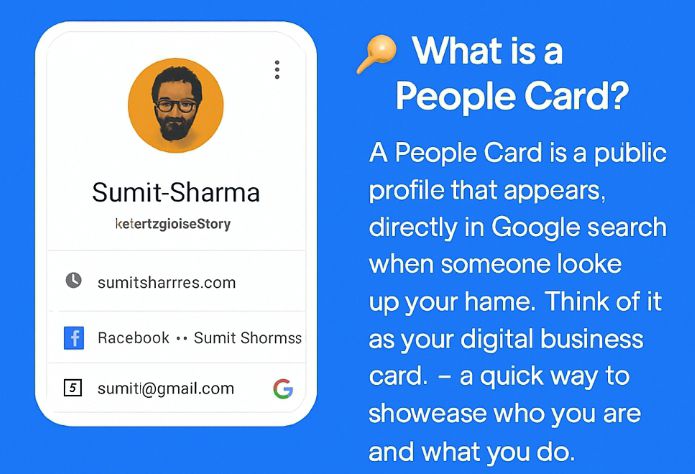
here is an example of how your profile looks on people card
How to Create Your People Card:
- On your mobile device, open Google Search.
- Type “add me to search” in the search bar.
- Follow the prompts to build your profile with details like your bio, links, and contact information.
🚀 Why It Matters
Visibility: Make it easier for people to find you online.
Credibility: Share accurate information about yourself.
Networking: Connect with potential clients, collaborators, or employers.
💡 Pro tip: Keep your People Card updated with fresh links and details so it always reflects your current work and achievements.
2. Claim and Optimize Your Google Business Profile
Your first step to getting found on Google Maps is to claim your Google Business Profile (GBP) — previously known as Google My Business.
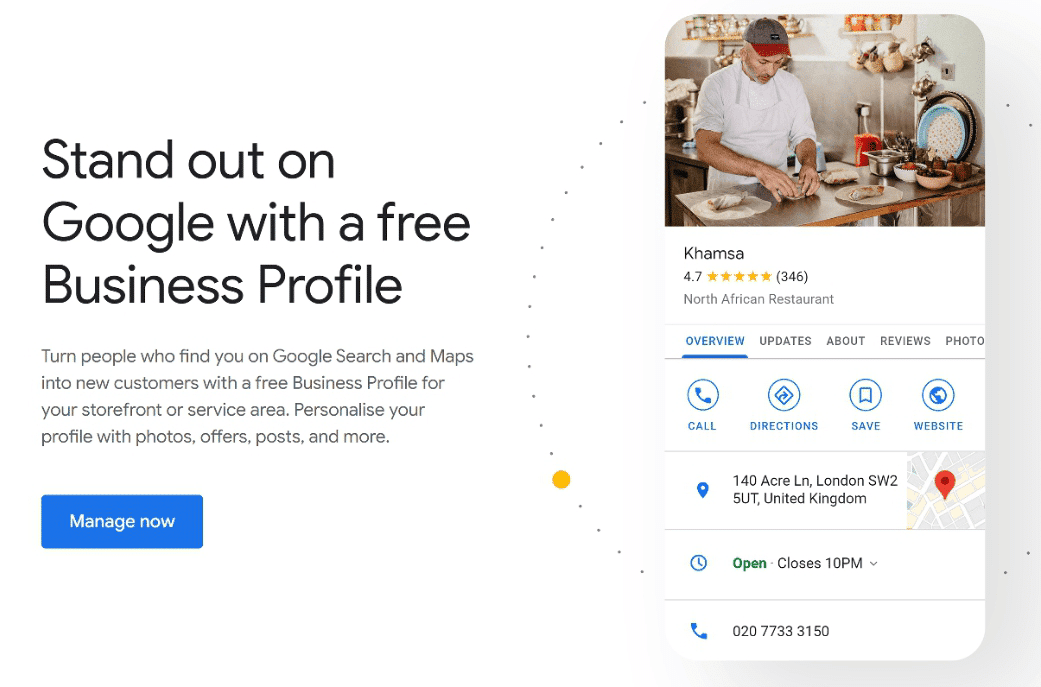
Here’s how to do it:
- Visit google.com/business.
- Sign in with your Google account and search for your business name.
- If your business doesn’t appear, click “Add your business.”
- Follow the prompts to verify your business by phone, email, or mail.
Once verified, optimize your profile by adding:
Accurate business name, address, and phone number (NAP)
A keyword-rich business description
High-quality photos of your products, team, and location
Updated operating hours and website link
✅ Pro Tip: Keep your NAP information consistent across your website, social media, and directories. Inconsistency can confuse Google’s algorithm.
3. Get listed on Google map
Once your Business Profile is verified, your location appears on Google Maps. But to stand out:
- Use a consistent NAP (Name, Address, Phone) across all platforms.
- Add service areas if you deliver or operate beyond your physical location.
- Respond to reviews to boost engagement and trust.
4. Use the Right SEO Keywords
Keywords help Google understand what your business does and where you’re located. For example, if you’re a web designer in Lagos, you should use keywords like:
“Web designer in Lagos”
“Best website development services in Nigeria”
“Affordable business website design near me”
Where to add keywords:
- Your website homepage and about page
- Blog posts and product pages
- Google Business Profile description
- Image alt text and file names
✅ Example: Instead of uploading an image called IMG_001.jpg, rename it “Lagos-web-design-services.jpg” before uploading.
5. Encourage Customer Reviews
Google loves fresh, positive reviews. Reviews not only build trust but also influence how high your business appears on Google Maps.
How to get more reviews:
- Ask happy customers directly after a purchase or service.
- Include a review link on your website and social media.
- Always reply to reviews — both positive and negative.
✅ Pro Tip: Google rewards engagement. Responding to reviews shows that your business is active and values customers.
6. Add Local Content to Your Website
Local SEO is all about connecting with your nearby audience. Create blog posts, guides, or videos that mention your city, area, or community.
If you don’t have website and what to get one, here is a complete guide’s for you
How to Create a Successful Website for Your Business_ https://apozul.com/create-successful-website
Examples:
“Top 5 Coffee Shops in Abuja”
“Why Local Businesses in Nigeria Need a Website”
“How to Choose the Right Marketing Agency in Lagos”
This helps Google link your website to local search intent — improving your chances of ranking for searches like “best bakery near me” or “digital marketing in Nigeria.”
7. Leverage Image SEO
Visuals attract attention, but optimized images attract traffic. Every image on your website or Google profile can improve your SEO if used correctly.
Tips for Image SEO:
- Use descriptive file names (e.g., abuja-restaurant-interior.jpg)
- Compress images for faster loading
- Add ALT text describing what’s in the image
- Geotag your photos with your business location (optional but helpful for Maps)
✅ Pro Tip: Use bright, high-resolution images that reflect your brand’s identity. Google values engaging visual content.
8. Build Quality Backlinks
A backlink is when another website links to yours. Google sees backlink as “votes of confidence.” The more trustworthy sites link to you, the higher your website authority grows.
Ways to earn backlinks:
- Collaborate with bloggers or local news sites.
- Share your content on social media and business directories.
- Guest post on relevant blogs in your industry.
✅ Example: If your business offers SEO services, write an article like “Top SEO Trends in 2025” for another website and include a link back to your site.
You can checkout backlinko resources on 7 strategies to get high quality-backlink 👉https://backlinko.com/high-quality-backlinks
9. Keep Your Information Updated
Google rewards businesses that keep their information fresh. If you move, change your phone number, or update your hours — make sure to reflect that everywhere.
- Update regularly
- Google Business Profile
- Website contact page
- Social media profile
✅ Pro Tip: Post regular updates and offers on your Google Business Profile — it shows Google your business is active and trustworthy.
Start by optimizing your Google Business Profile, using SEO keywords, collecting reviews, and applying image SEO techniques. Over time, you’ll notice your business ranking higher and gaining more local traffic.
Conclusion
Getting found on Google Search and Maps doesn’t happen overnight, but with consistency and the right strategies, you can grow your visibility and attract loyal customers.
💡 Did you find this guide helpful?
👉 Subscribe to my blog for more SEO and business growth tips.
💬 Leave a comment below to share your experience.
🌐 And don’t forget to visit my website for more practical guides and resources!